
































Products
Solutions
Resources
Company

Mobile application security vendors help you protect your code, data, server-side mobile API endpoints, and more. But which security capabilities are best provided by security vendors and which are best kept in-house?
One way to look at this challenge is from the standpoint of control over your critical assets. Even if the capability looks attractive, giving away control over your data, or (worse yet) the data of your customers, is a strategic mistake that can have devastating consequences.
Acme, a European company, protected their mobile application with an application security tool. One part of the protection scope was an automatic data-at-rest encryption capability. Acme’s security team made a decision to use the tool’s capability to automatically protect the sensitive data of Acme’s customers without writing a single line of code in Acme’s mobile application. This choice seemed attractive at the time, as it provided some cost savings to Acme’s team.
Internally, the tool’s data-at-rest encryption capability was encrypting the data of Acme’s customers using a randomly generated cryptography key that was controlled by the security tool’s vendor. The encryption was easy to implement and roll out, thanks to its no-code delivery method.
Due to changing requirements, Acme decided to switch to a different mobile application protection solution. This is where the surprise awaited them.
To understand why Acme faced major negative consequences, let’s take a close look at the implementation of the encryption in the vendor’s security tool. The automatic no-code capability implementation would augment file read and write operations in Acme’s mobile app with cryptography.
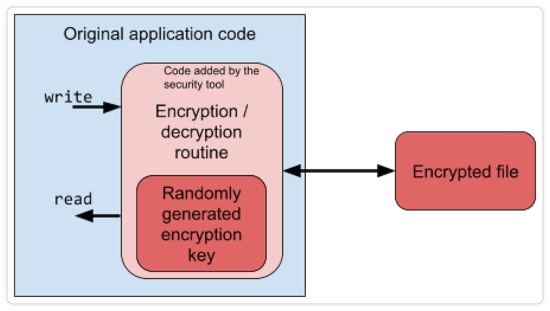
Take note that the encrypted file produced by the protected application contains customer data, but nobody at Acme knew how it was encrypted. The control remained with the tool’s vendor, whose code generated both the key and the decryption routine.
When Acme switched to a different security tool, the application protection changed–but the files created by the mobile app users during the time it was protected with the original tool remained. These files could no longer be read by the application. Since the algorithms and keys were outside of Acme’s control, there was no way for them to decrypt the files already stored on disk.
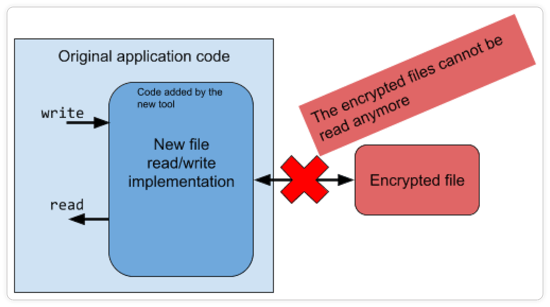
In the end, under pressure of unfulfilled requirements, Acme was forced to proceed with the tool change and absorb the damage associated with losing the data stored on the mobile devices of their customers.
As a consequence, some Acme customers lost their data.
The strategic mistake made by Acme’s security management team was to give a third-party tool control over their critical asset: customer’s data. The routine that was used to encrypt the data as well as the encryption keys were required components for access, but they both ended up being beyond the control of Acme’s security team.
To avoid vendor lock-in, all source assets (such as a mobile application’s source code, resources and assets, and especially customer data) must always remain under full control of the implementing organization.
Only the secondary materials and copies can be regularly handled by outside stakeholders like security vendors or consultants.
If your organization would implement the same encryption in-house, the code might look like this:
A simple one-line code can achieve the same purpose, but keep the important parts under your control:
Afterwards, just target your vendor’s generic protection capabilities to protect the code and keys you have just created. Here’s how to do it with Guardsquare:
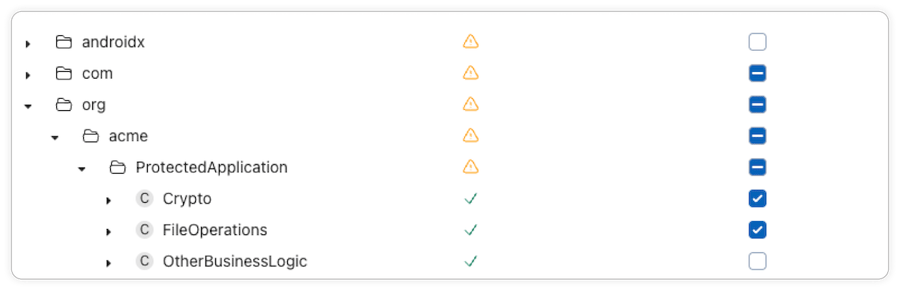
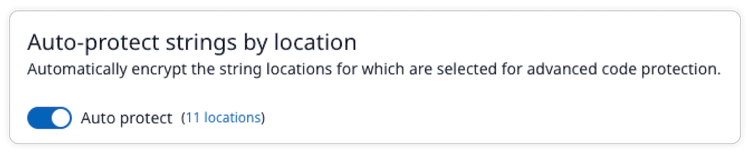
This solution is inexpensive to implement, while control over the data of your customers stays with you. Retaining control allows you to change vendors, update protection, or migrate data at any point in time, while keeping the mobile application secure.
Giving away control over your source assets (such as customer data and source code) is a strategic mistake that can result in vendor lock-in, putting your company at the mercy of a vendor’s decision-makers.
When you own your encryption logic, you can then choose best-in-class mobile app protection tools, like Guardsquare, to harden what you've built.
Contact a Guardsquare expert today to learn more.