.svg)


Quick jump
Use these links to jump to sections of the blog that are of particular interest to you. The blog proper starts afterwards.
- Should I use the Android Keystore?
- How do I check Android Keystore support on the user’s device at runtime?
- How do I use the Android Keystore?
- Use StrongBox for extremely sensitive keys
- Additional ways to secure my keys?
Introduction
The number of mobile apps that handle sensitive information is significantly higher than it was several years ago. And as mobile devices increasingly become the primary means of interacting with digital services, such as banking or government services, there will only be more such apps in the future. Developers are keenly aware that the user information they handle needs to be properly protected. Encryption is a common technique for protecting such information, for example through the KeyStore API.
Despite this awareness, research shows that in the particular case of Android, they tend to rely on software-backed cryptography. This may not even be a conscious choice on their part, since to this day, software-backed cryptography is still the default on Android.
The Android platform has offered hardware-backed cryptography implementations ever since Android 7. The documentation refers to these implementations collectively as the “Android Keystore system”. By isolating cryptographic keys in hardware, it meets rigorous security standards like OWASP MASWE-0014.
This blog explores:
- When you should use the Android Keystore system.
- What exactly it is.
- How to use it.
- Pitfalls you need to be aware of.
- What else you can do to safeguard your users’ data.
Should I use the Android Keystore?
You need to judge this based on:
- The kind of user data your application handles, examples being:
- Payment credentials.
- Personally identifiable information (PII), such as social security numbers.
- Privacy-sensitive information, like health data.
- Sensitive business assets that you consider as part of your threat model.
- For example, if your application generates an asymmetric keypair (which the Android Keystore can do, without ever storing the private key in memory).
- Regulatory requirements, such as those imposed by the GDPR.
- Your application’s minimum supported Android version is 9 (API 28), see
minSdkVersion.
To elaborate on the API level constraints:
| User device API level (Android version) | Considerations |
| >= 28 (Android 9) | You can be confident a hardware-backed keystore is available: Our threat monitoring data indicates that, in practice, the vast majority of devices running Android 9 or later support hardware-backed key attestation. |
| 24 - 27 (Android 7.0) |
|
| 18 - 23 | Devices are not required to provide a hardware-backed keystore. |
| < 18 (Android 4.3) | Android Keystore APIs are not available at all. |
Starting from Android 6 (API 23), you can check at runtime if a key is actually stored in hardware when you opt in to the Android Keystore, which we will show how to do a bit later.
Why is using the software Java Keystore not secure?
Software implementations such as Java Keystore expose cryptographic keys in application memory. Attackers with the necessary know-how can extract your keys from memory, and then decrypt data as they please.
The diagram below shows a hypothetical scenario where you:
- Generate a key server-side.
- Send it to a user device.
- Store it in the Java Keystore on the device.
- Retrieve it from the Java Keystore at a later point.
It also shows where attackers can attack the Keystore API to extract the key:
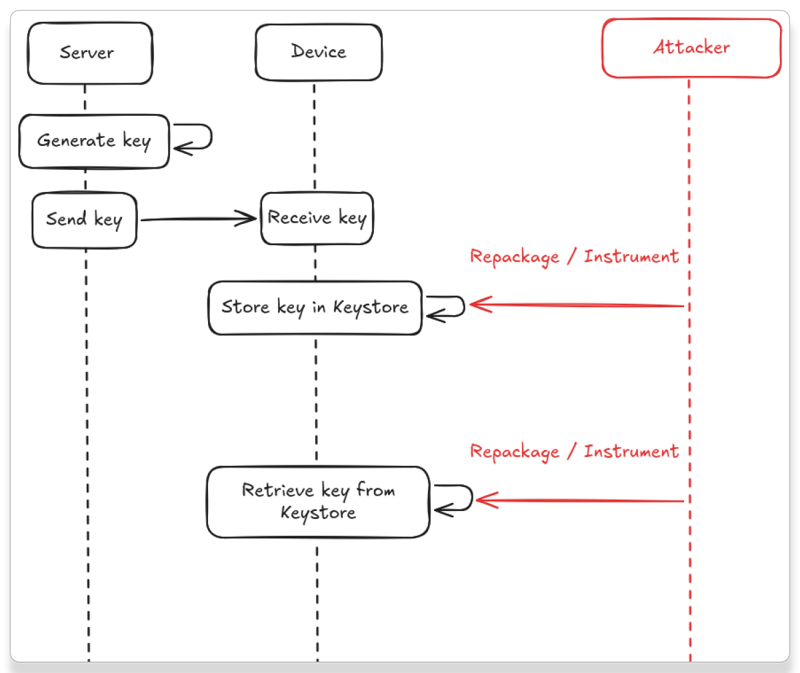
Appendix A fleshes out a code example and demonstrates practically how attackers can read the key.
Why is using the Android Keystore more secure?
The security benefits of Android Keystore are twofold:
- By design, key material never leaves the dedicated hardware component, and it never enters the application process. This makes extracting keys from the device significantly harder, since you cannot dump the keys from memory.
- It reduces the risk of unauthorized use of keys within the Android device. Applications must specify the authorized uses of their keys. The Android Keystore enforces the specified restrictions. Even if attackers manage to spoof cryptographic requests on behalf of the application, this principle limits the exact ways they can do so.
Which types of hardware keystore components exist?
Concretely, the hardware component can be either of these:
- A Trusted Execution Environment (TEE). It runs on the same processor as the Android OS, but is isolated from the rest of the system as part of ARM’s TrustZone.
- A StrongBox Secure Element (SE). This is a dedicated secure processor, entirely separate from the processor on which the Android OS runs.
Using the SE makes your cryptographic keys more resilient to extraction through side-channel attacks when compared to the TEE. However, as the documentation notes, this comes with a performance trade-off: The SE is slower, more resource-constrained, and supports fewer concurrent operations. You may want to use the SE only for extremely sensitive keys. For example, any keys that encrypt information related to financial transactions.
What exactly is different about software-backed vs hardware-backed?
The table below gives an overview of the differences:
| Software-backed | Hardware-backed | |
| Runtime performance | Fast | Noticeable performance overhead for large payloads, especially for asymmetric encryption |
| Vulnerability to extraction | Can be extracted from memory using common reverse engineering tools | Requires more advanced side-channel attacks |
| Enforcement of cryptographically strong configuration | Insecure defaults[1] | Enforces cryptographically strong configuration |
Runtime performance overhead
To illustrate the runtime performance overhead in more detail, we refer back to the research paper cited earlier. One of the experiments the researchers performed was to encrypt a payload of several different lengths with AES-GCM-256 symmetric encryption on a Pixel 8 across 10 iterations. The chart below shows the average durations they observed for these experiments:
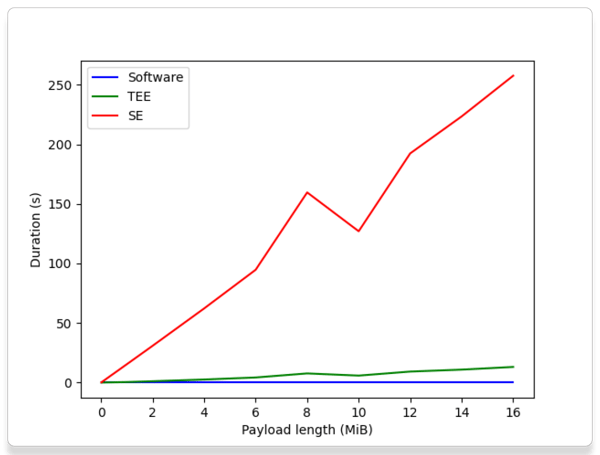
We can draw these conclusions from those observations:
- It’s very important not to perform cryptographic operations on the main thread when using the Android Keystore. Doing so carries a real risk of introducing Application Not Responding (ANR) errors, since you would be blocking UI operations.
- The StrongBox SE does indeed come with a steep performance trade-off, which quickly becomes quite bad as payload size increases. This reinforces the warning from the documentation that you should only use the SE if you need resilience against side-channel attacks.
How can I check at runtime that the user’s device has a hardware-backed keystore?
You can look at the result of PackageManager.hasSystemFeature(“android.hardware.hardware_keystore”). Like the documentation for FEATURE_HARDWARE_KEYSTORE says, this feature is guaranteed to be set for devices that launch with Android 12 (API 31) or later.
If the result is false, then it may still be the case that the device does have a hardware-backed keystore. The only reliable way to find out is to opt in to the Android Keystore, generate a key, and then check if it is indeed bound to hardware. The next section describes how to do that.
How do I actually use the Android Keystore? What are the caveats?
Use it
It’s pretty easy to opt in to the Android Keystore system. You just need to pass “AndroidKeyStore” as the type to KeyStore.getInstance.
Snippet 1 shows how to generate an AES/GCM key with no padding:
If you want, you can additionally check at runtime if a key is indeed stored in hardware:
- On Android 12 and later (API 31), you can check the return value of
KeyInfo.getSecurityLevel()for a particular Key object to see if it’s eitherSECURITY_LEVEL_TRUSTED_ENVIRONMENTorSECURITY_LEVEL_STRONGBOX. TheKeyInfoAPI reference gives an example of how you can get a KeyInfo instance for a Key object. - On Android 11 and below (API 30), you can use
KeyInfo.isInsideSecureHardware(), instead.
As you can see, you do need to use dedicated Android Keystore APIs to actually generate keys, namely the KeyGenParameterSpec class.
Don’t call the Android Keystore on the main thread
The hardware component can only handle so many concurrent operations at once. Your application will potentially contend with other applications on the device that simultaneously request cryptographic operations from the Android Keystore.
We recommend:
- Always perform Android Keystore operations on a background thread. You are very likely to get Application Not Responding (ANR) errors if you don’t do so.
- Provide UI feedback, such as a progress indicator, if the operation takes longer than expected.
Handle KeystoreExceptions gracefully
It is possible on some devices that Android Keystore operations fail under specific circumstances. These failures manifest as KeyStoreExceptions. You could implement a retry mechanism when such exceptions do occur. You can fall back to software-backed cryptography as a last resort, but this opens the door for attackers to force a fallback to software and make key extraction easier.
Android 13 (API 33) introduces a dedicated KeyStoreException type for Android Keystore. It captures additional information compared to the standard Java KeyStoreException:
- If the failure was system-specific or key-specific.
- If retrying the operation at a later time is likely to succeed.
Does using Android Keystore give me perfect security?
No. Attackers can potentially use keys that are stored on the device, even if they are unable to actually extract the keys from the device. Therefore, encrypted data that’s stored on the device itself can still be vulnerable. You can mitigate this by specifying during key creation that the user needs to authenticate themselves before use (e.g. through biometrics).
Opting in to the Android Keystore currently results in using the TEE by default. The TEE is more vulnerable to key extraction using side-channel attacks than StrongBox (SE). The SE is more isolated from the rest of the system, making it more resistant to side-channel attacks. Naturally, using the SE still doesn’t prevent attackers from potentially using keys that are stored inside the SE; it’s just much more difficult to extract the keys from the SE to then use them outside the device itself.
How do I use StrongBox?
StrongBox was first introduced in Android 9. Even then, you first need to check that the device has a StrongBox implementation and indicate whether you want to use it if it does. If you request StrongBox on a device that does not support it, you will get an exception at runtime.
Taking all that into account, you can adapt Snippet 1 into Snippet 2 like so:
We already mentioned above that StrongBox-backed cryptographic operations can be orders of magnitude slower than TEE-backed operations. You will need to be careful about where exactly to request StrongBox backing, especially if you expect to encrypt payloads that are several megabytes large.
Financial transactions are a good candidate for StrongBox backing, even if the payloads involved are relatively large.
Anything else I can do to secure my keys?
We have three concrete suggestions which we will describe in more detail:
- Make the user authenticate to their device before they can use your keys.
- Use key attestation where available.
- Apply static and runtime protections to your code.
Require biometric authentication and/or lock screen credentials
Starting from Android 11 (API 30), you can require that the user authenticate before using a key by calling setUserAuthenticationParameters. You can require biometric credentials, lock screen credentials, or both. Doing this makes it more difficult for attackers to use keys to decrypt data stored on the device itself.
Verify hardware backing through key attestation
Modern Android devices are also capable of performing key attestation. It allows your application to verify that the keys you use in your application really are backed by hardware, and to verify the properties of those keys.
Key attestation also tells you whether a full chain of trust exists that verifies the device’s boot image itself has not been tampered with. For example, an attacker might try to use an OS-level or kernel-level tool that intercepts requests to create keys and then falsely claim that the created keys are stored in secure hardware. If the key attestation result says that a full chain of trust does indeed exist, you can be confident that such a tool is not being used.
Apply static and runtime protections to your code
Finally, you can add static and runtime protection to your application to:
- Hide where and how you’re using cryptographic operations.
- Make it more difficult for attackers to use your application’s keys, even if they compromise a device.
Guardsquare solutions offer both static protection, through code obfuscation and encryption techniques, and runtime protection, which defends against common threats such as application repackaging and hooking.
Conclusion
While software-backed cryptography remains the Android default, it leaves keys vulnerable to memory extraction and often uses weaker cryptographic defaults. With broad support on devices running Android 9 (API 28) and later, it provides strong security benefits, as long as you properly manage potential pitfalls.
Key takeaways:
- Cryptographic key isolation: Using a hardware-backed keystore ensures your keys are never exposed in memory, which defeats memory extraction attacks, even if the OS is compromised.
- Performance considerations: Android Keystore operations can have significant runtime overhead. Never call the Android Keystore on the main thread.
- Handle failures gracefully: Under rare circumstances, correct use of Android Keystore operations can throw
KeystoreExceptions. - Resilience against side-channel attacks: The Android Keystore uses the TEE by default. StrongBox is more resilient against side-channel attacks than the TEE, but is significantly slower than the TEE. Consider using it for particularly high-risk operations, such as financial transactions.
- Be aware of remaining security gaps: The Keystore prevents key extraction, not key usage. Pair Keystore operations with user authentication (e.g. biometrics).
- Hide what you’re using cryptographic keys for in the first place: Throw attackers off by applying both static and runtime protections to your application code.
Appendix A: Key generation and interception example
We’ll demonstrate that using the defaults to initialize a software Java KeyStore into which we import an encrypted key leaves that key vulnerable to extraction from memory, as long as that key remains in active use in the application.
Specifically, this example:
- Creates an AES key.
- Exports it to a file, in JSON Web Encrypted (JSE) format.
- In an Android application, it reads the key from the file, decrypts it, and loads it into a Java KeyStore.
Create the encrypted AES key and export it
This Python Snippet 3 generates an AES key and stores it in a file in JSE format. At time of writing the used jwcrypto version is 1.5.6.
We ran it locally and got an encrypted_key.jwe file. For this particular run, the print statement reported:
The contents of encrypted_key.jwe are:
Load the encrypted key into a KeyStore
Now, we read in the file in an Android application and load the key into a Java KeyStore. We use a few third-party dependencies to make the example a bit easier to write. These are:
- Gson, version 2.13.2.
- Nimbus JOSE + JWT, version 10.8.
We declare the Gson object structure as follows in Snippet 4:
We now push encrypted_key.jwe to an Android device’s /data/local/tmp directory and import it into a Java KeyStore like this in Snippet 5:
Note that for the sake of the example, we load the key material we decrypt into a SecretKeySpec object. It’s a class that holds the raw bytes of a key. This is still a necessary step to register the AES key we decrypted from the file into our KeyStore object. We do specify password protection through a PasswordProtection object, meaning that the KeyStore will store our key in encrypted format.
Then, we retrieve the imported key from the keystore like this in Snippet 6:
Attack the key
Now that we have an Android application, we can see how it behaves at runtime. Since we have the source code, it’s pretty easy for us to do so: We can simply step through the code with a debugger. Let’s see what we find when we do so on a physical Samsung A34 5G (Android 16) device.
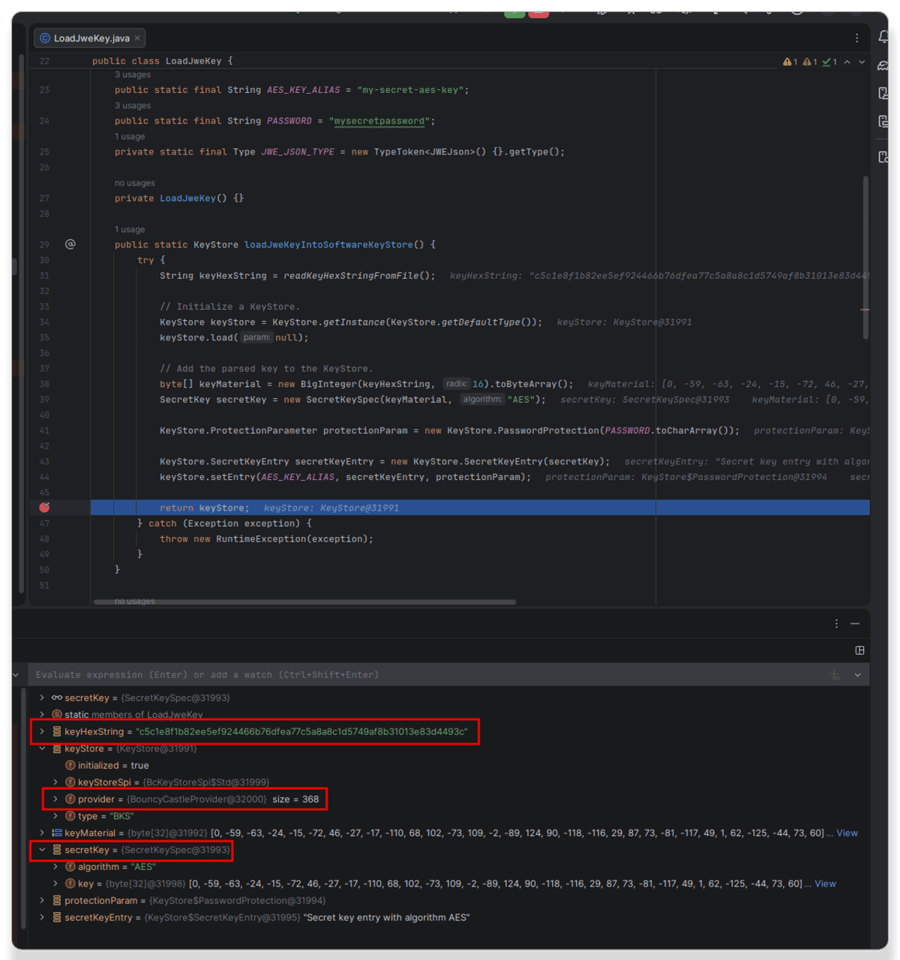
We see that KeyStore.getInstance(KeyStore.getDefaultType()) resulted in the KeyStore being initialized with a BouncyCastleProvider. Bouncy Castle offers APIs for software-backed cryptography. This demonstrates that using the defaults indeed results in us getting a software KeyStore.
We see also that keyHexString matches what Snippet 3 gave us, so the decryption of the key from the JSE contents indeed happened correctly.
Make note of the hash code of the secretKey object (31993).
We now step into the part where we load the key from the KeyStore:
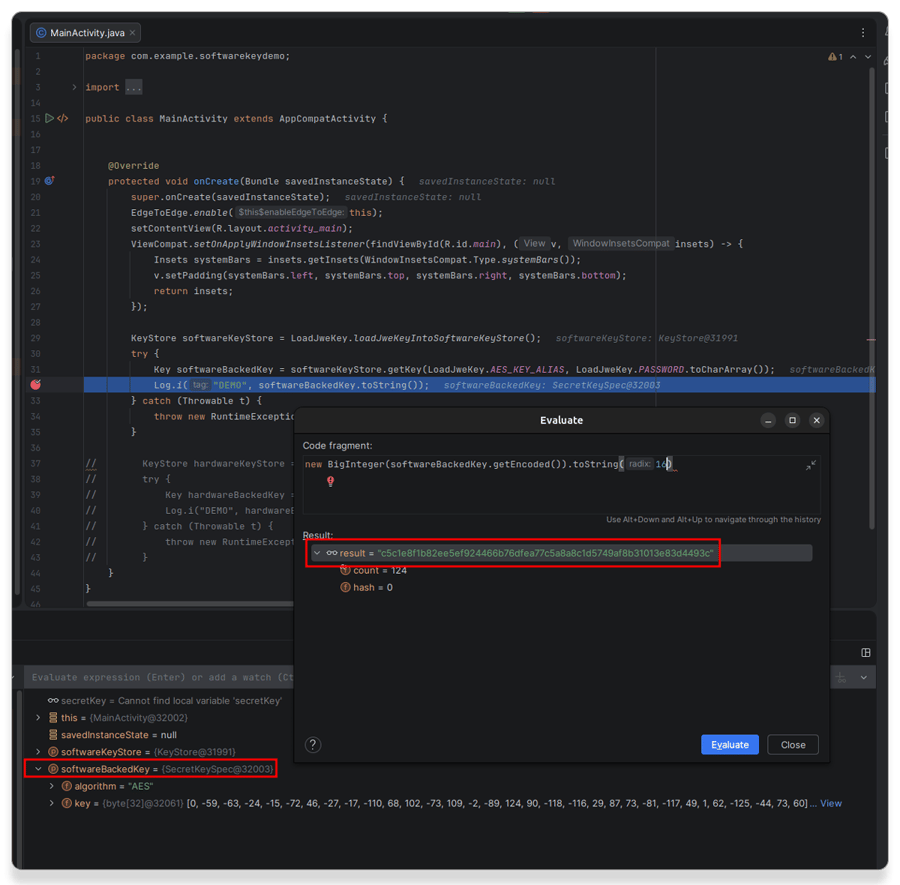
We see that under the hood, the Key object is also a SecretKeySpec object. Importantly, it’s a different object from the SecretKeySpec object we used as a medium to import the key into the key store (hash code 32003 vs the earlier hash code 31993). Indeed, if you look a little deeper into the Android platform’s Bouncy Castle code, it ultimately instantiates a new Key object based on what the entry from the KeyStore contains. That Key object contains the actual key material. As a result, when we print the hex string from the Key’s underlying byte array, we see our original hex string again.
Attackers don’t have the source code. They will therefore only have a release version of the application available, which isn’t debuggable. However, attackers can still modify the application to become debuggable, or they can instrument the application with a tool such as Frida to achieve the same thing.
This Frida script (Snippet 7) prints the key bytes in hex string format:
Example usage after you install the demo application:
We initially started from an encrypted key. However, we now see that every time the key is used, it is plainly visible in the application’s memory. The key is either entirely unencrypted, or it is still encoded but holds the necessary information to decode it. An attacker with the necessary skills can therefore dump the application’s memory and recover the key from the memory dump if they have full control over the device the application runs on!
Appendix B: Closer look at Android Keystore internals
Let’s take a look at what we see when we debug Snippet 1 on the same Samsung A34 5G device:
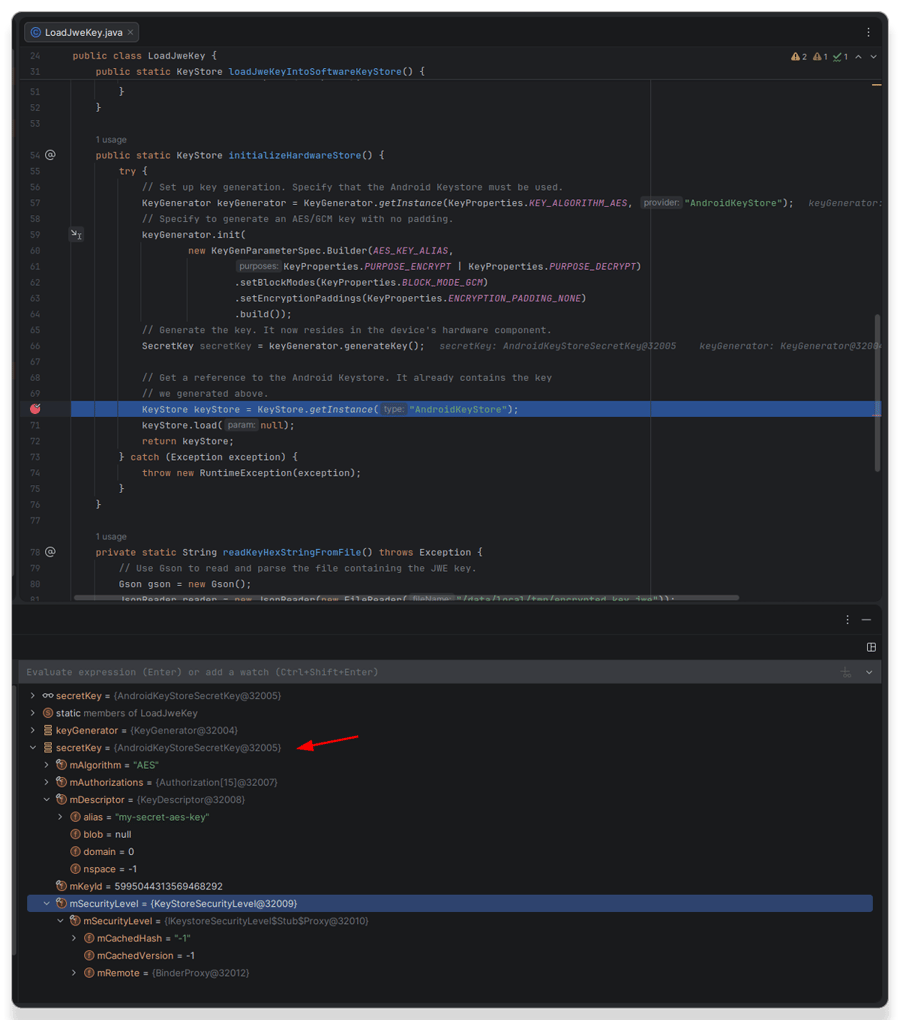
The SecretKey object we get is an AndroidKeyStoreSecretKey. It has no fields that contain the key material. Indeed, its getEncoded implementation just returns null. It therefore is just a handle to a key entry that is stored inside the device’s Android Keystore — the key material itself is not visible in the object.