.svg)

Applying an optimizer like ProGuard or R8 can significantly improve the size or performance of your application. However, using such tools requires adding configuration in the form of keep rules to ensure your app stays functional after the optimization steps. This may result in some friction when utilizing these tools. In this article, we will reiterate and highlight some advice on keep rules and showcase how our guided workflow alleviates the difficulties of finding these keep rules by automating some of the work for you.
The need for keep rules
Optimizers like ProGuard or R8, or obfuscators like DexGuard, make significant modifications to the structure of your code while processing your app. Some examples are: moving the contents of methods/classes (e.g. method/class merging or class encryption), changing names of identifiers (name obfuscation), and removing unused methods/classes (shrinking). With such modifications, the original name of these entities will no longer be present in the app. These missing entity names may cause issues when they are retrieved dynamically. A typical example of such runtime retrieval of entity names is reflection, which will no longer work if the expected names have been (re)moved.
These tools will typically have some analysis built-in which recognizes certain patterns automatically to avoid crashes without configuration, but there are both practical and theoretical limitations to such analysis. For that reason, it is necessary to specify additional configuration input to these tools to ensure they do not apply changes to parts of the application where it would be unsafe to do so.
In this post, we will take a look at two ways of configuring keep rules:
- First, we dive deeper into an example of iteratively debugging keep rule issues on a Kotlin app enabling R8, which uses the Moshi library with reflection.
- Last, we show our guided workflow on the same app where navigating through the app enables us to easily create a crash-free app without needing to debug keep rule issues.
Configuring keep rules example: Moshi reflection
In this example we set up a simple Kotlin application to illustrate the workflow. Note that writing keep rules for Kotlin applications may sometimes require more knowledge of how the classes are compiled to java bytecode. You can read more on this in our post about writing keep rules for Kotlin applications.
Typically, applications won’t directly use reflection APIs, but they may use libraries that make use of reflection under the hood. One such library is Moshi, a serialization library. It is used in the example below to convert a simple Kotlin data class to and from a JSON representation.
The data class User contains a name and age field.
Below is the code that uses the Moshi library to deserialize a JSON string into a User class, which is added into the onCreate method of our main Activity.
Moshi internally has its own additional keep rule configuration, which is applied in addition to the rules defined for your application, which are called consumer rules. Note that you should be wary of what consumer rules are applied due to libraries. For example, if a library adds -keep class * { *; }, a configuration that keeps the class and method names for all classes, then this rule will not only be applied to the classes from that library but also the classes in your application!
The consumer rules ensure no Moshi internal classes are unintentionally changed by R8, but we still need to figure out which keep rules are needed for our application. If we simply enable R8 and run our app we get the stack trace below.
Note that a retraced version of the stack trace is shown, it has been automatically converted to use the actual class names. Though in the error message the class name v0.a hasn’t been converted. If we look at the linked mapping file, which contains the mapping of all how all the entities have been renamed by R8. We see the following entry which mentions that this class corresponds to com.example.User.
Errors due to these changes in the application can manifest in many different ways and depend on different factors such as which specific libraries are used. They will not necessarily be the same message as above. But often they will contain some hint of which class is involved in the crash. Since it mentions the com.example.User class, we might try the following rule.
This ensures that this class’ name is kept, but will not ensure anything about its names or fields. If we run the app with the above rule applied we get a new stack trace.
The stack trace now directly mentions the com.example.User class with its original name, hinting to us that the rule for that class is not finished yet. Since the hints of the stack trace stop there and do not give further information what is actually the cause, some element of trial and error is involved in figuring out which parts of the application cause which crashes when they are not kept.
Since we know the application deserializes this class via reflection, we can make an educated guess and try a rule that also keeps its members. Once we apply the following rule to keep the fields in the User class as well as the class itself, then the application works as expected.
In this section, we saw that resolving issues with keeprules typically requires in-depth knowledge of the source code and the libraries it uses. In an actual app you will likely need to do several iterations of rebuilding and testing the app, and analyzing the crash to obtain a variety of rules that need to be added.
Writing broad rules first can be a helpful trick to narrow down first if the issue is due to missing keep rules, from which you can then narrow down the rule to target fewer entities to see what entities are the cause of the problem. However, you should be careful to not stick with too overly broad rules as this can hinder the effectiveness of the optimizer or obfuscator you are using, as also indicated in this advice on configuring R8 rules.
In the next section, we will take a look at a different approach of finding the right configuration for your app where you only need one iteration to find all configuration rules.
Guided workflow
Guided workflow is built for DexGuard, extending ProGuard by adding app protection features on top of the ProGuard functionality. DexGuard also has a name obfuscation feature, similar to R8, in addition to a number of robust app protection features.
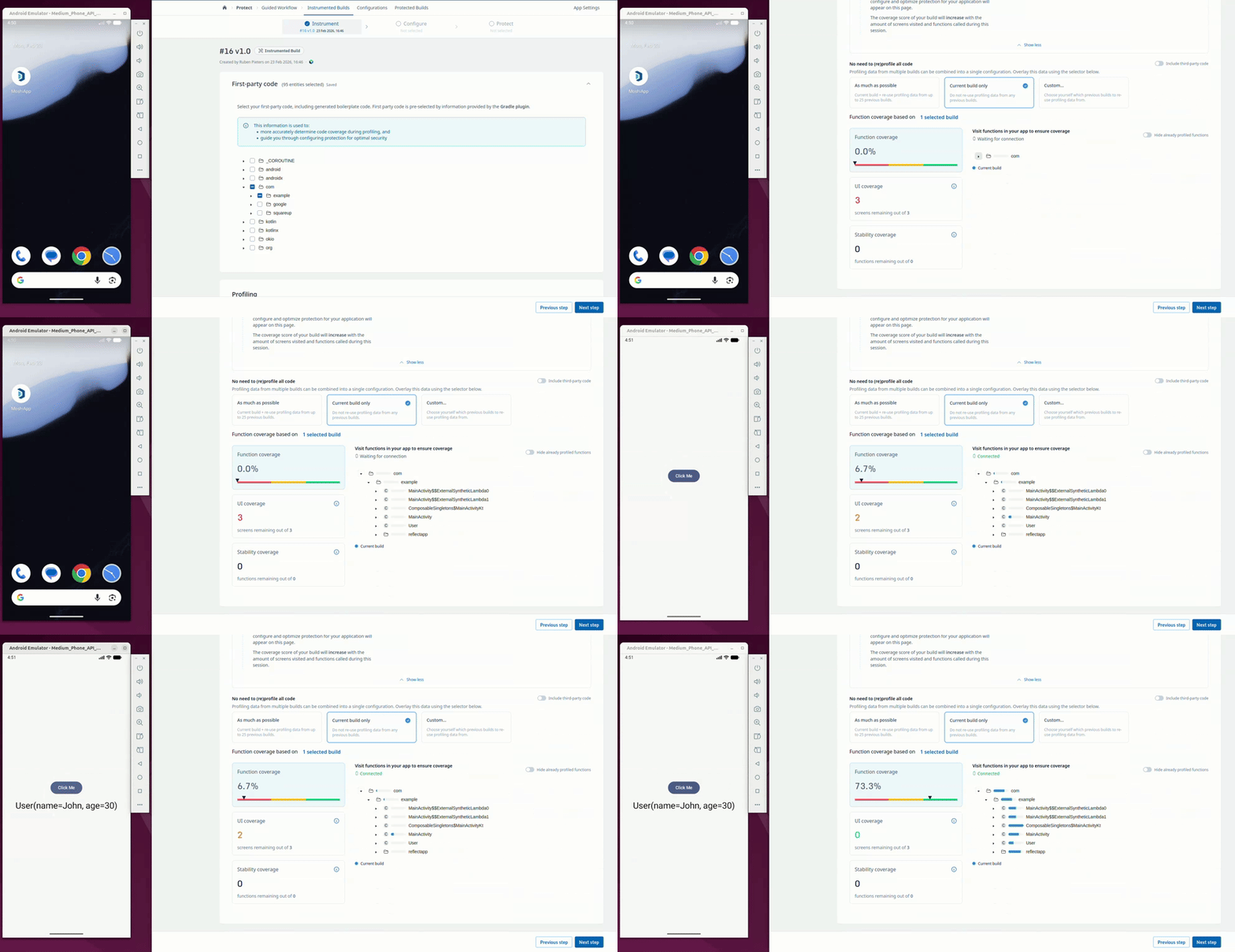
The general approach of the guided workflow happens in 2 phases. First, in the instrumentation phase you generate an instrumented build and go through the screens of your application where usage of reflection will be detected at runtime and used to automatically collect keep rules. Second, in the protection phase you can configure your protection settings which automatically incorporate the detected keep rules, alleviating some of the work for you.
The ./gradlew guardsquareInstrumentApk command creates the instrumentation APK. The web UI then gives guidance on how complete your application profiling is. During the profiling of the application, the usage of reflection is detected and keep rules are collected. Behavior of the original app is also preserved, so the app does not crash or show incorrect behavior, even when reflection is used.
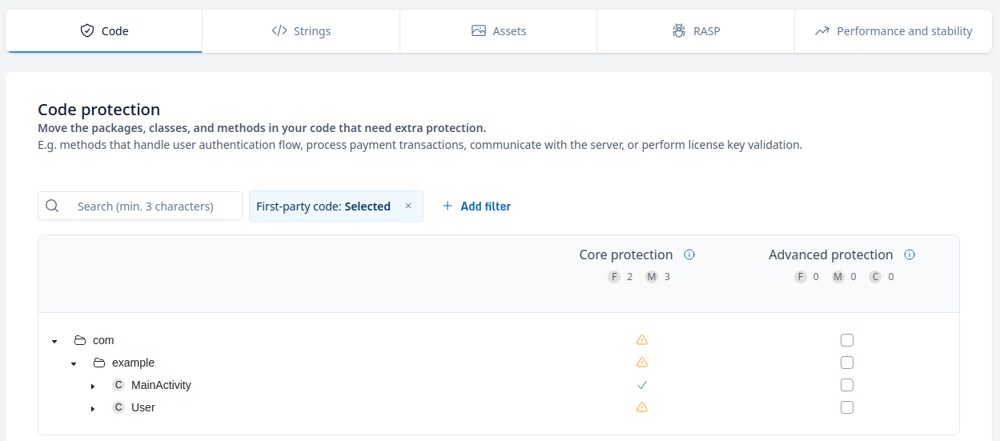
Once profiling is complete, the configuration screen allows the developer to configure the protection features applied to the app. The User class is marked with a warning sign (⚠️) to show that automatic keep rules have been collected for it and has limitations with regards to its protection.
Using the ./gradlew guardsquareProtectApk command then processes the application, which will automatically take the rules collected during the profiling phase into account. The processed application starts up without any crashes.
This shows that guided workflow can be used to create a correctly configured application while needing less knowledge of the app to configure the right keep rules. This approach avoids iterations of finding a crash, resolving it with a keep rule and repeating that process. Instead, the app gathers all necessary rules to be applied all in one run.
Conclusion
In this article, we have highlighted the need for keep rules when interacting with optimizers and obfuscators. We have shown an example of how to approach debugging a crash due to a missing keep rule in the regular flow with manual configuration. Next to that, we have shown that same example when using our guided workflow, which automates collecting keep rules during the instrumentation phase.