




































Products
Solutions
Resources
Company

Whether you are building a food delivery service using the Google Maps API, making your app ready for the AI age with the Gemini API, or taking advantage of the vast analytics and reporting capabilities provided by Firebase – third-party cloud APIs (especially Google’s API ecosystem) are the lifeblood of modern smartphone apps.
One fundamental challenge these service providers face is that they need to be able to identify the correct developer account associated with each app’s requests. For this purpose, so-called API keys are the method of choice. A secret string is embedded inside the app and attached to each API request, allowing the API provider to authenticate the request source.
But what happens if an attacker gets ahold of this key and attaches it to their own request? The cloud endpoint is not going to be able to distinguish this from legitimate requests originating from your app – so the attacker’s API call will count against your quota. They don’t have to pay any money for their own quota while causing big bills for their victims. AI-related APIs like Gemini or OpenAI can be especially pricey, with API key theft potentially resulting in bills of several thousand dollars.
In today’s post we’ll address how to protect yourself against these sorts of attacks.
The default suggestion you will come across when researching how to prevent Google API key misuse is the “application restriction” functionality offered directly in the Google Cloud Console:
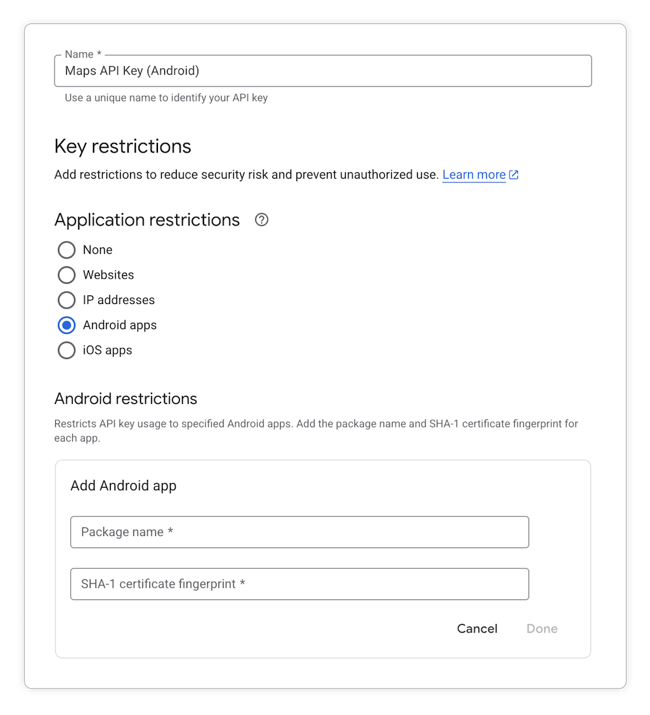
For Android apps, the required information is the package name and the fingerprint of the certificate used to sign it. iOS app restrictions will ask you for the app’s bundle ID. (For more details, refer to Google Cloud documentation on this topic.)
Once the restriction is set up, simply using the API key in a different app stops working, with an error message notifying the user of an app restriction mismatch.
To be able to verify if this first-party restriction functionality really prevents API key theft, we need to check under the hood to understand how it works.
This is actually surprisingly simple. The app needs to attach certain HTTP header fields to the request, X-Android-Package and X-Android-Cert for the Android metadata, X-Ios-Bundle-Identifier for iOS. The Google endpoints then simply compare the string values associated with these header keys to the values stored during the app restriction setup process and reject any request containing unrelated data.
This begs the question: can’t attackers add these extra headers as well?
Let’s take a quick look at how an attacker script could retrieve all the necessary information for spoofing such a request.
For keys restricted to a certain iOS app, this is pretty trivial: iOS apps contain a file called Info.plist that is required to contain the app’s bundle ID under the CFBundleName key.
An Android app’s package name is available in a similar way, this time in the AndroidManifest.xml file, under an entry called package. It may seem more difficult to access the certificate hash as required by the API headers, but this can also be extracted very easily. Depending on the Android SDK version, the certificate is either stored inside the APK in the META-INF directory, or inside the APK’s zip file container itself. A convenient way to retrieve the SHA1 hash is to use the apksigner command line tool, where the command apksigner verify --print-certs will print the hash in several formats.
Lastly, the User-Agent HTTP header needs to be set to Android or Ios and then you have everything you need to issue a successful API request.
Google has several different pages in their documentation that describe app restrictions and this bypass risk is unfortunately only noted in one of them:

Google’s suggestion of carefully monitoring API usage may be a way to at least detect API key theft, but this is not a scalable solution. Instead, it would be preferable to find a solution that prevents misuse in the first place. The following sections will show different options, depending on the concrete anatomy and security requirements of your app.
Apart from only monitoring usage metrics, Google and other API vendors offer the option to set a usage cap on certain API calls. This helps avoid unexpected cost spikes, but once the usage limit has been reached, the affected API will not be available anymore for all of your app’s users. Denial of service attacks on your app are therefore still possible.
The main risk for most apps is that simple scraper tools can help attackers extract API keys from apps at a large scale and then quickly test which ones are usable for the desired API. These attacks don’t particularly care about the actual app the final key was extracted from, so if the automated scanner doesn’t yield any results for an app, it simply skips to the next one. To defend against this sort of attack, the key goal is then to increase the effort required to extract the key from your app bundle. As there are many apps with similar API keys out there, automated attacks will target the lowest hanging fruit. It’s usually enough to mask the API key string in the app bundle, so that regex-based scanners can no longer detect it.
However, simple masking techniques like base64 encoding can also be detected and reversed in an automated way. So the most robust approach here would be to use a strong obfuscation technique like polymorphic string encryption, which changes the embedded decryption algorithm with every new build you publish. When combined with runtime application self protection (RASP) features, even manual reverse engineering attacks become much harder, making your app an unpopular target for attacks.
While RASP and obfuscation significantly slow down reverse engineering of API keys, the key is still fundamentally embedded into the publicly available app bundle. So if your threat model classifies an API key as a high-value asset, you also need to take determined attackers into account – those who specifically target your app with increased effort that will eventually be able to extract the key.
The only bullet-proof way of fully preventing this scenario is to never publish the key in the first place. Instead, each relevant request should be proxied through your own backend server, which has access to the API key in a secure way. However, this now shifts your security boundary: without further improvements, attackers can simply call your backend endpoint to have it perform the desired API request on their behalf.
So while this looks very similar to the original situation (i.e., we have a server that needs to ensure its API endpoint is only called by legitimate users), it being the app’s own backend server gives us much more flexibility.
Oftentimes, mobile apps already have a concept of user accounts, where users can only use the app (or parts of it) after authenticating against the app’s backend server with their personal credentials. If this is the case, access to third-party APIs can be guarded behind these user accounts as well, making the proxy endpoint on your server for “authenticated users only,” just like the APIs you already have.
This allows even more granular control of API usage on your side, instead of setting quotas via the Google Cloud Dashboard (e.g., gating access to especially expensive APIs behind premium user tiers).
If your app doesn’t have user accounts, an alternative is to verify the application instance instead of the user’s identity. The goal here is to ensure that only the original app bundle is allowed to call the backend proxy endpoint, while repackaged apps or scripts are denied access.
The general name for such a verification process is app attestation. Backend API requests require an authentication token similar to user authentication scenarios, but this token is granted to the application as part of a challenge-response flow.
The app collects runtime information about its own integrity and the integrity of the surrounding environment in the same way as regular RASP setups. While RASP would then evaluate these measurements locally (and then, for example, crash if tampering is detected), app attestation requires this information to be forwarded as-is to the backend server. The server then verifies if there are indications of attacks typically used in the context of API key theft (e.g., whether the source of the API request is a repackaged app or even just a Python script). Only a legitimate instance of the mobile app will then receive the necessary authentication token that the proxy for the third-party API endpoint requires. Attackers will be locked out.
Any API key you ship to the user via your app bundle needs to be treated as public knowledge, unless you take explicit countermeasures to prevent automated, large-scale API key theft. Restrictions offered by the API vendor, such as Google’s app restriction mechanism, are easy to bypass and don’t meaningfully prevent request spoofing. Instead, a good way to prevent the most common attacks is to hide the key using obfuscation techniques, so that it can’t be detected by automatic scrapers.
High-effort attacks that specifically target your app, however, will fundamentally not be fully preventable unless you shift the general approach and store the API key exclusively on a separate backend server. In this scenario, you can have much more fine-grained control of verifying the authenticity of an incoming app request via existing user authentication flows or by incorporating an app attestation approach.

