.svg)


Here’s a security incident scenario. You ship a mobile app with insufficient tampering protection, and someone finds it. Now the app can be modified and repackaged into a malicious version with almost no effort.
Not a great place to be, but fixable. You release an updated patched version, pull the vulnerable one from the Play Store and the App Store, and the problem goes away. Right?
Wrong.
Old versions of your app never really disappear
Once you publish code or data anywhere to a public repository, assume it's out there forever. It doesn't matter how few people had time to grab it before the takedown. Bots are constantly scraping every app released to the official stores, then uploading the originals, or modified versions, to third-party stores.
So staying secure means making sure the old version stops working, period. To achieve this goal, you have a range of choices at your disposal - each good in certain situations. Let's look at what actually works from a security standpoint. In this scenario, assume the old version is running in the hands of a malicious party who has no intention to cooperate with any of the automatic application update mechanisms.
Here’s how I rank different approaches to mobile application old version deprecation from a security perspective - from naive to actually working:
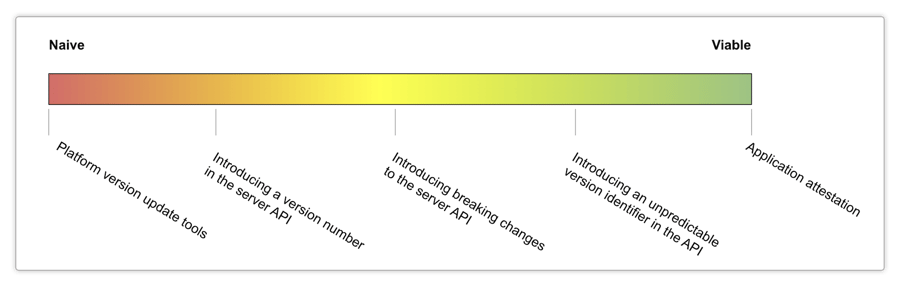
Using platform version update tools
Google provides an SDK for automated in-app updates. Apple doesn't offer a direct equivalent on iOS, but building your own isn't hard by querying your server for the latest version number and guiding the user to update.
Google's in-app updates API lets you use a full-screen blocking prompt to force an update. It's a convenient way to push updates and distinguish between critical and non-critical releases.
However, from the security point of view, this way of forcing updates to your application is not effective. The code responsible for finding updates and initiating updates is located entirely at the client side and is structured like this:
Blocking an automated update would be as simple as skipping adding of the onSuccess listener for the appUpdateInfo task.
Since the API requests that follow don't distinguish between versions, skipping the update has no consequences, at least until your server API introduces a breaking change that finally locks old versions out.
Version number in the server API
One simple fix you can make to make sure that the application does not ignore updates is introducing the current application’s version number to API requests. It can look like this:
The server then checks whether that version is still allowed, for example:
@app.route('/api', methods=['POST'])
def handle_api_request():
  app_version = request.json['app_version']
  if not is_version_allowed(app_version):
    abort(403, 'Application version outdated')

  # Handle the API request further
While this approach will make it impossible to skip an update by disabling the code responsible for checking for an update, it is still relatively easy to spoof the version number and provide a different version that works. On Android, the simplest move is repackaging the app with a different version number in the manifest file:
AndroidManifest.xml
In addition to that, there is another factor at play. Application version numbers usually follow a predictable scheme: after 1.0.0 usually comes 1.0.1, then 1.0.2, then at a certain point in time comes 1.1.0, and so forth. This means that it is possible to make the tampered application future-proof by adding easy logic that tries different version numbers until one of them works.
If the version codes are sequential, an attacker can brute-force them, trying each one in order until it gets through.
Introducing breaking changes in the server API
Spoofing version numbers works right up until the server API changes in a way that actually breaks things. Say one of the parameters used to be a number, and now it’s a string, or a new mandatory parameter is introduced in the API. In this case, older versions of the mobile application will naturally stop working and will require an update.
Skip the update or spoof the version, and the app simply can't talk to the server anymore.
Depending on how serious the breaking change is, it can take anything from several minutes to many days for the reverse engineer to catch up. The downside of this method is that introducing complex breaking changes requires time and effort, and introducing them for artificial reasons will make the development process inconsistent and complex to follow.
The breaking change has to be non-trivial and unpredictable to make an impact. At the same time, inventing new breaking changes for every version can be exhausting.
In conclusion, while this solution provides more security, it’s also error-prone and costly to maintain.
Introducing an unpredictable version identifier
What if we take the best from the latter two approaches - introduce a parameter that would identify the version to the server API, and combine it with an unpredictable breaking change?
Let’s try to do that by identifying application version with a random string. Suppose, the version 1.0.0 would be identified with a string FH4QA6IE3B, and the version 1.0.1 would be identified with another string, D0BH1793P2. You will generate a new random string when you will release the version 1.0.2.
Our client-side code in the application version 1.0.0 would look now like this:
The server-side code would check the string identifier against a list of allowed identifiers to determine whether the application can work with the server API.
On its own, this solution may not seem much stronger than the Version Number in Server API solution. Let's see how it can be improved to mitigate the two main risks applicable to this solution.
Risk 1: Version identifiers are easy to find in the application code
While it is not possible to guess what the version identifier for version FH4QA6IE3B would be in the future, once a new version is released, the new version identifier, “D0BH1793P2”, will be easy to lift from the new application code.
To protect against that, you can use an application obfuscation tool like Guardsquare DexGuard and iXGuard. Guardsquare tools will obfuscate code, encrypt strings and resources, and add run-time self-protection (RASP) to make sure the new version number is very difficult to lift. Polymorphic protection will ensure that lifting each new version identifier will be a challenge for a reverse engineer.
Risk 2: Version identifiers can be recovered with MitM
Even when the code is obfuscated, the version identifier will be plainly visible and can be lifted using a man-in-the-middle attack. Once lifted, old applications can still use a spoofed identifier to work with the server API.
To protect against that, you can further modify the code to use the version identifier as a signature key instead of passing it in its plain form. The workflow will go like this:
- The server generates a random “challenge” value.
- The client application signs it with the version identifier and obtains the “response” value.
- The client application sends the response to the server API endpoint.
This way, sniffing for the response value and lifting it from the application will not produce any meaningful result since that response would be valid only for that challenge value.
In conclusion, generating unique version keys and backing the mechanism up with a challenge-response system is a solid foundation for a secure version deprecation solution. To make it work practically, the solution has to be well defended against reverse engineering and tampering at all times, such that the version cannot be spoofed by either learning the version key or by lifting the code responsible for the version checking.
In other words, a secure version deprecation solution is a part of a holistic client-side security solution. This is one of the reasons why we’ve added an application attestation solution to our ecosystem.
Application attestation
Let’s take the previous example even further. In addition to random signature keys and one-time challenges, let’s introduce a third-party server that issues security verdicts for every application request.
Now in addition to version identification, the overall security and authenticity of the client-side application will be baked in the security verdict that would be generated on the server side. This would isolate the logic of the verdict generation from the client side and establish a trusted source of truth for application authenticity.
This is one of the many things that Guardsquare application attestation does. Acting in tandem with DexGuard and iXGuard, it combines strong genuinity checks with RASP, configurable policies, and server side monitoring.
Version deprecation is a security strategy, not a formality
None of these approaches work in isolation. In-app update prompts get skipped. Version numbers get spoofed. Even a well-built challenge-response system falls apart without protection against reverse engineering and tampering. Real version deprecation means treating your old app versions the same way you treat live threats, meaning something you have to actively shut down, not something to walk away from. The goal isn't to make spoofing a version hard. The goal is to make it prohibitively hard, at every layer, all the time.
Want to see what that looks like in practice? Talk to our experts about how DexGuard, iXGuard, and application attestation work together to keep tampered app versions locked out for good.