

Your app uses HTTPS. Your server has a valid certificate. You have never bought anything from eMudhra.
Were your users at risk? Are they still?
That depends on three factors: SSL Pinning, Certificate Revocation List, and Certificate Transparency checks.
Below, we’ll explain how they work and help you understand whether your app was affected
What happened
On 17 October 2026, a researcher reported that private keys associated with eight eMudhra intermediate CA certificates had been compromised. Attackers could use these keys to create fake certificates for any HTTPS server. By intercepting your app’s connection, they could impersonate your server, read passwords and session tokens, or change the data sent between the app and server.
The affected intermediates were created on 30 April 2025, meaning the weak keys could have been used to forge certificates for almost 18 months before the problem was reported. We do not know whether attackers did so.
The layers of trust
Why would an app trust a malicious certificate?
Operating systems keep a list of trusted root CAs. A root CA can sign an intermediate certificate, which can then be used to issue certificates for servers. Your app follows this chain to decide whether it trusts the server’s certificate.
An eMudhra root CA was among the trusted roots. The compromised intermediates were trusted through it, so apps could also trust certificates created by attackers using those intermediates’ keys.
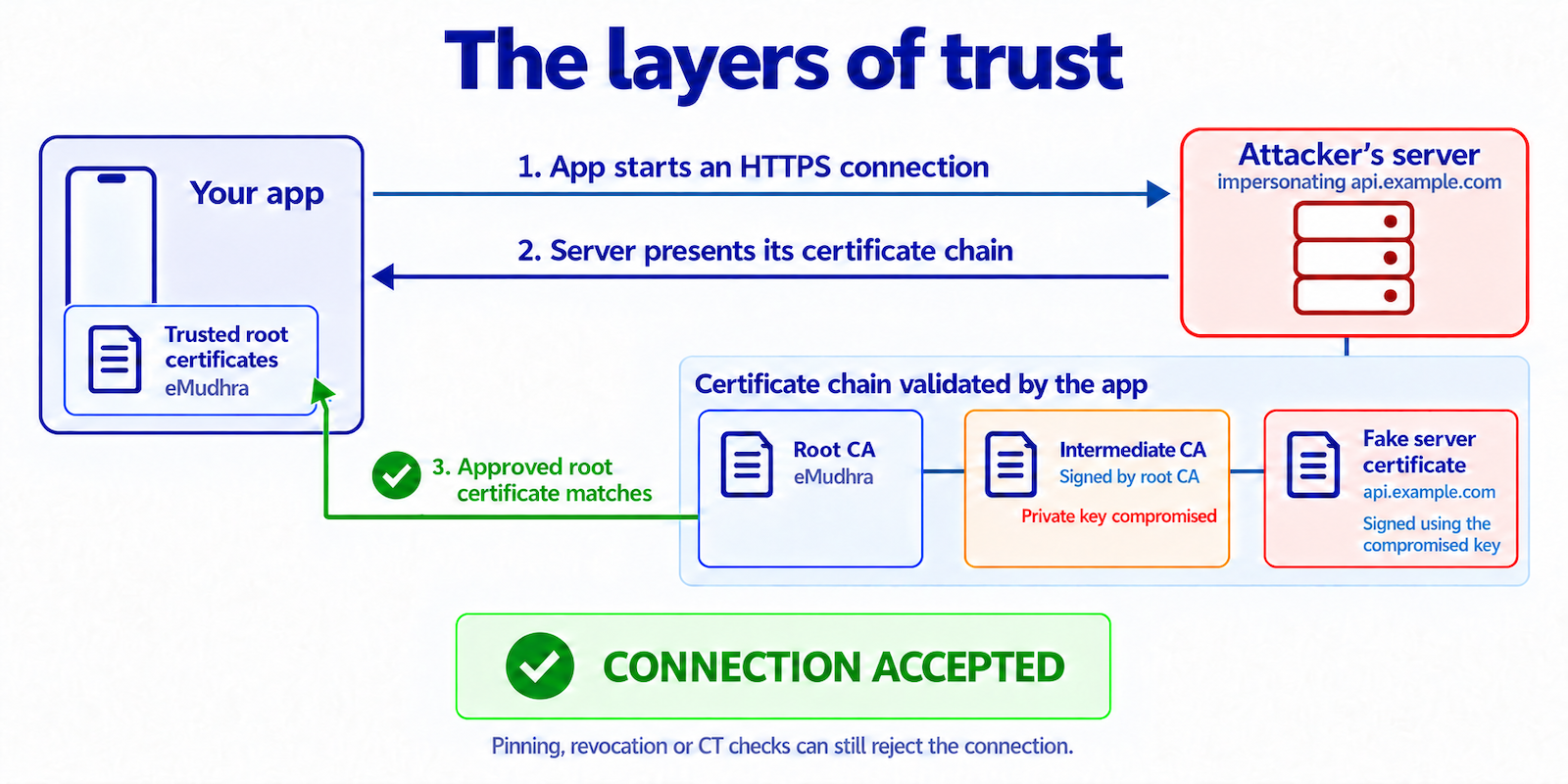
Apps do not have to rely on that trust alone. Three additional checks can help block malicious certificates: SSL pinning, Certificate Revocation List checks, and Certificate Transparency. Some are built into the operating system and may have protected your app without you having to do anything.
Below, we’ll explain each check, then help you work out whether your app was affected or is still at risk.
Check 1: SSL Pinning
SSL pinning is a mechanism used in an app to allow connections only to servers whose certificate chain contains a public key approved in advance. If no key in the chain matches, the app rejects the connection, even if the operating system trusts it.
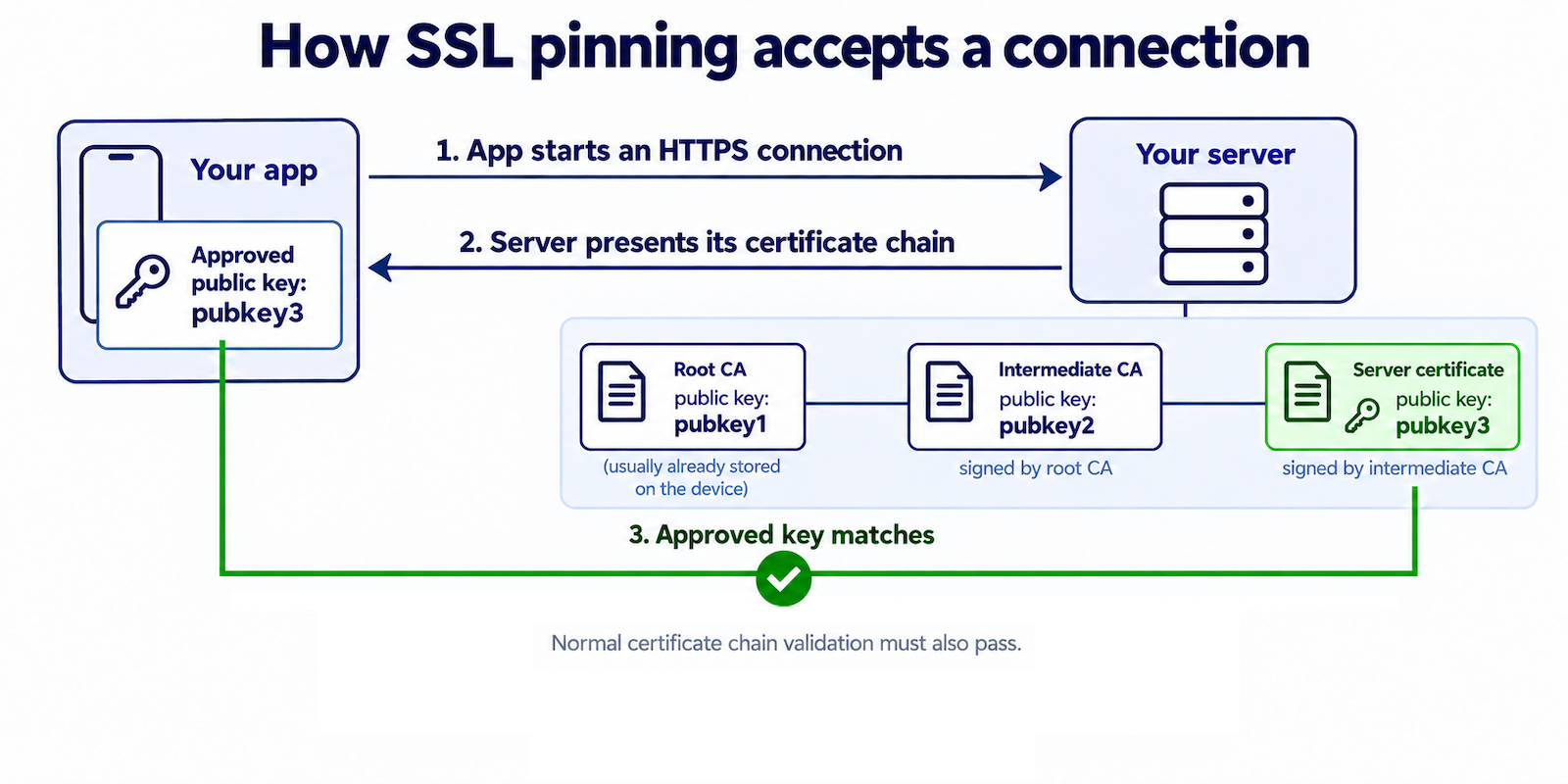 If your app uses SSL pinning and does not pin a compromised CA, your users are safe from this attack.
Check 2: Certificate Revocation Lists
When a certificate is compromised, the CA can revoke it. But how does a device learn to stop trusting it?
The CA publishes that information in a Certificate Revocation List (CRL). Downloading a CRL for every connection would add delays and network traffic. Instead, Google and Apple push their own lists of blocked certificates to devices, without requiring a full operating-system update.
Google distributed the Android block through Google Play Services on 19 October 2026, roughly two days after the report. Delivery was not immediate, but restarting the device could trigger an immediate update. Devices without Google Play Services need a fix from their manufacturer, OS maintainer, or app developer.
Apple began blocking the affected eMudhra certificates on 19 October 2026 through certificate configuration updates.
Check 3: Certificate Transparency
Certificate Transparency (CT) is a system of public certificate logs run by different organizations. CAs submit certificates to these logs and receive signed proof of submission. Apps can check this proof when connecting to a server. If it is missing, a CT check rejects the certificate even if a trusted CA signed it.
Google reported that no website certificates from the affected intermediates were logged. CT checks would therefore have protected apps against those forged certificates. But these checks are not always enabled. The next section, Was your app at risk, explains when they apply on Android and iOS.
Was your app at risk?
There’s a lot to consider. These five questions will help you work out whether your app is at risk now or was at risk before.
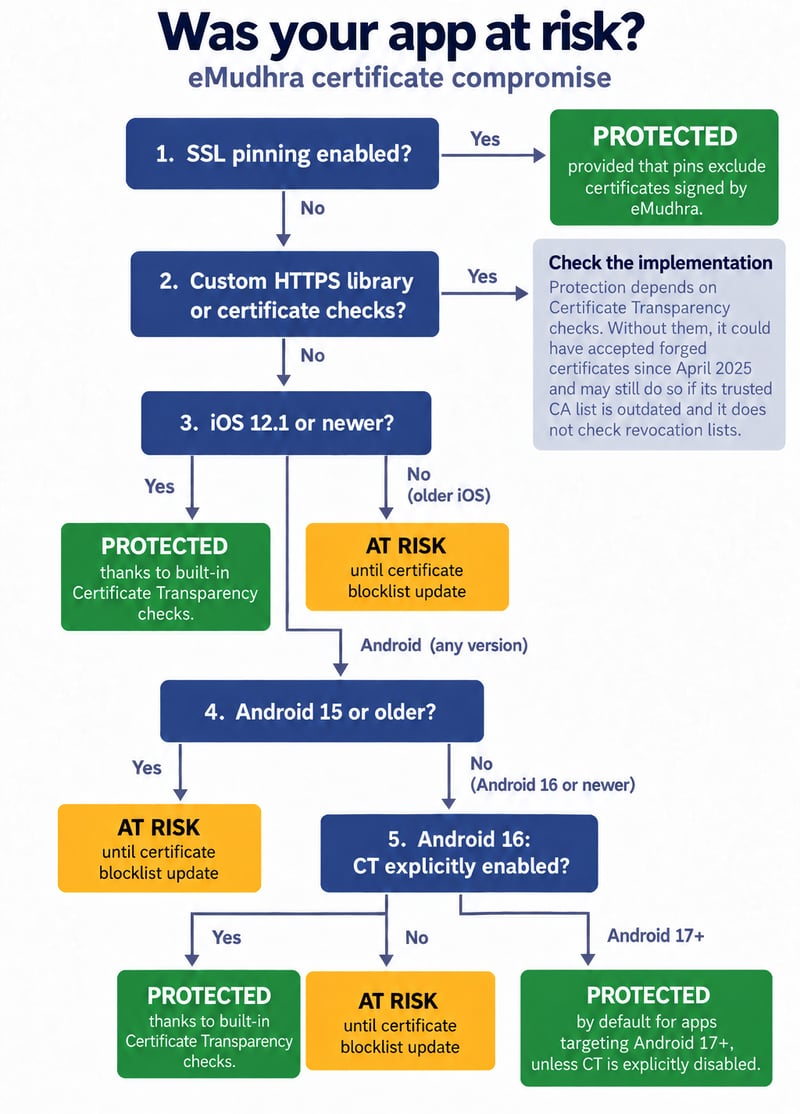
For the answers that say ‘until the device received the certificate blocklist update,’ Google Play Services matters. Devices with it could receive the fix automatically, though delivery was not immediate.
How to check your own app
A man-in-the-middle (MITM) test puts a proxy between your app and its server to check whether it accepts forged certificates.
Mitmproxy added an option for the eMudhra incident:
It creates certificates using a compromised eMudhra key. Unlike a normal mitmproxy setup, you do not need to install its CA certificate on the device.
Route your app’s traffic through the proxy and use its network features with a test account. Keep the app’s security checks enabled. If mitmproxy can read the HTTPS traffic, your app might have been affected before the updates. Test different supported OS versions.
How to protect your app
Use SSL pinning for your app’s connections to servers you control. Limit trust to a small number of CAs, or pin your server’s public key directly.
Use the system’s networking APIs where possible. They use the platform’s certificate validation, receive its certificate blocks, and apply CT checks where supported and enabled. If you use a custom HTTPS library be aware of how it handles revoked certificates and CT checks, since these provide additional protection.
Add another layer of protection with Device Binding, supported by App Attestation. Signing and encrypting requests and responses at the application level adds protection on top of SSL/TLS. If TLS fails, this extra layer can still stop attackers from reading or changing those messages, provided the keys were exchanged securely.
Takeaways
The eMudhra incident is a reminder that certificate trust can fail. Many apps could have accepted forged certificates as early as April 2025, and some may still accept them today because revocation checks and Certificate Transparency vary across apps and devices.
This also matters beyond phones. Some digital photo frames, video intercoms, smart TVs, projectors, and desk phones run Android. Devices whose manufacturers no longer provide updates may never receive a fix. If they still trust the compromised CAs and have no other protection, they can remain at risk.
That makes app-level defenses important. SSL pinning can reject forged certificates even when the device trusts the issuing CA. Signing and encrypting messages at the application level adds protection if an attacker still manages to intercept the TLS connection.
To learn more about how Guardsquare can help, get in touch with us today.


